Showing posts with label Hybrid. Show all posts

Monday, November 1, 2010

October Published Work


My Bee-autiful Larissa

Digital Supplies: Kit: Boo-tiful Fun - a ScrapStreet Collaboration featuring Jill D-Zines (ScrapStreet), Brush: Obsidian Dawn, Software: Adobe Photoshop CS4, Font: Tektron Pro.

Design Notes: I wanted the antennae to stick out from the photo, so I removed part of the photo background using the rectangular marquee tool and the eraser tool. I used a small soft brush eraser around the antennae. For the background I used two papers. To make the design fade away from left to right, I applied a layer mask to the top layer and dragged the linear gradient tool accross the paper. The top paper blending mode is set to Multiply with an Opacity of 45%. I used some rolled paint brush strokes to create a mask. With this mask I cut out the black paper behind the photo.


Tooth Fairy


Supplies: Paper, Felt Stickers: BasicGrey, Rub-On Alphabet: Scrapworks, Bling: Heidi Swapp, Marker: Color Workshop (P&M Products), Font: Corbel, Other: thread. Tools: Other: sewing machine.

Design Notes: I cut along the design on a strip of patterned paper to make it look like a punched border or even a small banner, and then I inked the edges with a marker. I thought it looked a bit like a row of "teeth" so it would enhance the theme of my page.


Halloween Favor Baggies

Digital Supplies: Kit: Boo-tiful Fun - a ScrapStreet Collaboration featuring Jill D-Zines (ScrapStreet), Template: Janneke Smit, Software: Adobe Photoshop CS4, Font: Tempus Sans ITC.
Supplies: Photo Paper: Staples, Ribbon: Offray, String: Making Memories, Ink: Rubber Stampede, Adhesive: Tombow. Tools: Hole Punches, Scissors: Fiskars, Other: scoring tool, ruler.


Appel Flappen

Digital Supplies: Kit: Peace, Love & Happiness by Libby Weifenbach Design (Sweet Shoppe Designs), Font: Tahoma.

Design Notes: Appel Beignets are a traditional Dutch holiday treat. My husband, and many other people, call these Appel Flappen instead, hence the title. I placed the photos in such a way that there is a bit of a white space path from the start to the end result. To further identify the steps in the recipe I used large numbers, which double as embellishment.

All these were published in the October 2010 issue of ScrapStreet Magazine.

Monday, October 4, 2010

September Published Work

This card was published in the September issue of ScrapStreet Magazine, and was based on this sketch.


Thanks

Digital Supplies: Kit: Art Palette Page Kit by Cilenia Curtis, Software: Adobe Photoshop CS4.
Supplies: Photo Paper: Staples, Ribbon: Morex, Tag: Eyelet Outlet, Brads: Doodlebug Design, Ink: Rubber Stampede, Adhesives: 3D-Dots (EK Success), Scrapbook Adhesives (3L), Glue Dots International, Other: jump ring.

Saturday, September 4, 2010

Girls Night Out

ScrapStreet is having a Beverage Crop to celebrate their 5th anniversary with daily challenges and games!

I made this card for the Cosmo Challenge, using this week's bonus sketch by Courtney Baker for 2S4Y:


Girls Night Out

Digital Supplies: Cocktails, Anyone? by Dora's Lemon Love Creations (ScrapStreet), Font: Segoe Print, Software: Adobe Photoshop CS4.

Supplies: Paper: Boxer Scrapbook Productions, Photo Paper: Staples, Card Base: Halcraft, Ribbon: Michaels, Bling: Heidi Swapp.

Thursday, September 2, 2010

August Published Work


Peace

This is a hybrid page. I used a digital kit to create the background and to print out embellishments. I printed the background paper out on tissue paper for extra texture, and then adhered it to cardstock for strength. I printed the embellishments separately on cardstock. I printed the title and journaling on a transparency sheet and cut the transparency into strips. Before I printed the title, I added a drop shadow to the letters to make it look like they have some dimension.

Supplies: Cardstock: Canson, Transparency Film: 3M, Buttons: Buttons Galore & More, Marker: Color Workshop (P&M Products), Other: tissue paper.
Digital Supplies: Kit: Peace, Love & Happiness by Libby Weifenbach (Sweet Shoppe Designs), Brush: Obsidian Dawn, Font: Baby Boston, Software: Adobe Photoshop CS3.


Just add water

I made a simple page for an everyday moment of my son playing in his small inflatable pool in the backyard. For the sun I used a transparent PVC flower, cut the petals into sun rays and painted it yellow. I used a large brad for the center of the sun, but instead of going through the page with the prongs, I folded these behind the sun and attached the sun to the page with glue dots. The swirl is cut out from one of the patterned papers.

Supplies: Paper: Cherry Arte, My Mind's Eye, Cardstock: Canson, Petersen-Arne, Rub-Ons: Making Memories, Flower: Maya Road, Brad: Chatterbox, Paint: Delta, Marker: Sakura, Pen: ZIG Memory System (Kuretake), Software: Adobe Photoshop CS3.

This layout is based on this sketch.


Both pages were published in the August issue of ScrapStreet Magazine.

Friday, May 7, 2010

April 2010 Publications

I was asked to design with the fabulous papers and printables from the Gypsy Sisters line made by Kaisercraft!
I created the following projects, which were all published in the April 2010 issue of ScrapStreet Magazine.


Six

Supplies: Paper, Die Cuts, Chipboard Alphabet, Pearls: Kaisercraft, Cardstock: Bazzill Basics Paper, Paint: Junkitz, Pen: ZIG Memory System (Kuretake), Font: Shruti.

Design Notes: To embellish my page, I hand cut some flourishes from the patterned paper. A simple pen stroke around the edge of the page makes a quick and pretty border. I printed the journaling directly onto the background.


Altered Birdhouse

Supplies: Paper, Die Cut, Bling: Kaisercraft, Birdhouse: Michaels, Flowers: Doodlebug Design, Paint: Ceramcoat (Delta Creative), Junkitz, Adhesive: Martha Stewart Crafts (EK Success), ZIG Memory System (Kuretake), Glue Dots International, Tools: paint brushes, sanding paper, files.

Design Notes: The paper posies were too pink to match the Kaisercraft papers, so, to end up with more of a salmon color, I painted these first with a diluted yellow paint. I painted all the sides of the pieces before adhering the papers. I adhered a die cut around the hole in the front of the birdhouse, after cutting out the center and cutting off the edge.


Thank YOU

Supplies: Paper, Rub-Ons, Pearls: Kaisercraft, Cardstock: Bazzill Basics Paper, Flower: Prima Marketing, Button: SEI, String: Making Memories, Paint: Junkitz, Adhesive: ZIG Memory System (Kuretake), Glue Dots International.

Design Notes: I hand cut some flourishes from the patterned paper. I adhered these to the yellow paper and cut away the paper "above" the flourishes. I painted the white string yellow to match the papers. Some rub-ons and pearls finished the card quickly.


Easter Basket

Supplies: Paper, Die Cut, Bling: Kaisercraft, Flowers: Bazzill Basics Paper, Basket Template: Janneke Smit, Adhesive: 3D-Dots (EK Success), ZIG Memory System (Kuretake).

Design Notes: Since the Kaisercraft papers are double-sided, I did not have to worry about adding a liner to my basket. I simply cut out my template and folded over the scalloped edge. I raised the die cut with foam adhesive to make it stand out some more.


4 U

Supplies: Paper, Die Cut, Chipboard Alphabet, Alphabet Stickers, Bling: Kaisercraft, Cardstock: Bazzill Basics Paper, Buttons: SEI, Pen: ZIG Memory System (Kuretake), Adhesive: 3D Dots (EK Success), ZIG Memory System (Kuretake), Glue Dots International, Other: ric-rac, thread, needle. Digital Supplies: Printable: Kaisercraft, Software: Adobe Photoshop CS4.

Design Notes: Kaisercraft also has free printables on their website to match your collection! I downloaded the PDF, used software to cut and resize the desired pieces and then printed these out. Dressing up the chipboard alphas is very simple since the alphabet stickers are exactly the same size.

Wednesday, April 7, 2010

March 2010 Publications

The following projects were published in the March issue of ScrapStreet Magazine:


Uni

Cardstock: Bazzill Basics Paper, Chipboard Star: Scenic Route, Stickers: American Crafts, Ribbon: Morex, Bling: Heidi Swapp, Eyelets: Making Memories, Software: Adobe Photoshop CS3, Font: Baby Boston.

I used my photo editing software to create and print the moon shape. I used this shape to cut out the cardstock and the main photo. I cut out a photo of the stuffed toy and used that as an embellishment. I punched holes in the star and the moon and hung the star from the moon by threading ribbon through the eyelets in the holes. To create a visual triangle I used bling on top of the unicorn's collar, around the star and on top of the title. I chose a dark grey background to make a "night" scene.


Thanksgiving 2008

Digital Kit: Thankful by Rachness Designs for ScrapStreet.com, Stitches: All Stitched Up by Zoe Pearn Designs (SweetShoppeDesigns), Software: Adobe Photoshop CS3, Font: Blink Janneke Style.

Although I used 9 photos on one page, I kept the design clean and organized by combining the photos in just one block.


Lucky

Papers: Kaisercraft, Ribbon, Buttons: SEI, Chipboard: Bazzill Basics Paper, Cherry Arte, Rub-Ons: Making Memories, Daisy D’s, Brads: Queen & Company, Stamps: PSX, Ink: Rubber Stampede, Paint: Delta, Junkitz, Card Base: Halcraft, Font: Bradley Hand ITC.

I painted four chipboard hearts and arranged these into a shamrock shape. The tiny brads fill up the holes in the heart "buttons" exactly.


St. Patrick's Day 2009

Digital Kit: Feeling Lucky by Handmaid Designs for ScrapStreet.com, Fonts: Rockwell, Blink Janneke Style.

I simply stretched the frame to fit my photos. To extend the ribbon underneath the photo, I copied and pasted the left end side of the ribbon using the rectangular Marquee Tool and moved this to the left.

Thursday, January 7, 2010

December 2009 Publications

These were my publications in ScrapStreet Magazine December 2009. The first three were design team work for Digital Delights by Louby Loo digital stamps:


Digital Stamp: Digital Delights by Louby Loo, Papers: American Traditional Designs, Cardstock: Bazill Basics Paper, Canson, Take-Out Box, Ribbon: Michaels, Glaze: Aleene’s, Embossing Glitter: gel-à-tins, Markers: P&M Products, Sakura, Pen: ZIG, 3D Adhesive: EK Success, Tools: Hole Punches (Making Memories, Fiskars), Embossing Heat Tool (Marvy Uchida), Other: brads.

I covered all the sides of the box with two different papers, leaving a small border at the edges and folds. Instead of coloring in the image, I used it as a paper piecing pattern. I added some paper glaze to the holly berries and I heat embossed the frosting on the ball.


Digital Stamp: Digital Delights by Louby Loo, Papers, Chipboard: Sandylion Sticker Designs, Bag: Michaels, Pencils: Staedtler, Ribbon: SEI, Beads: JudiKins, Brad: Making Memories, Eyelet: Magic Scraps, Tools: Hole Punch (Making Memories), Water Brush (EK Success).

I colored the image with watercolor pencils. To give the brim and ball of the hat some sparkle, I brushed on glue and sprinkled a layer of tiny clear glass beads on top. I made a quick tag by punching a hole through a chipboard circle, setting an eyelet and threading ribbon through it. I love working with (digital) stamps because you can use any color you want on the image to match the rest of your project.


Digital Stamp: Digital Delights by Louby Loo, Paper: Dream Street Papers, Cardstock: Canson, Pencils: Staedtler, Ribbon: American Traditional Designs, Chipboard: Scenic Route, Paint: Junkitz, Beads: JudiKins, Pen: ZIG, Tools: Hole Punch (Making Memories), Water Brush (EK Success).

I colored the image with watercolor pencils. I printed the reindeer three times. The bottom layer is cut into an oval. For the second layer I cut out the reindeer and adhered this onto the background, and the third layer are just the nose and the bow adhered on top. I painted the chipboard star, brushed on glue, and sprinkled a layer of tiny clear glass beads on top for a subtle shine.


Digital Supplies: Winter Shimmer Collaboration Kit by Jopke Designs and Handmaid Designs for ScrapStreet.com, Fonts: Monotype Corsiva, Adobe Garamond Pro.

I love to use digital kits for my holiday photo cards. I create one or more card designs with a kit, and when the photos for this season are ready, I can use as many different photos as I want on the same card designs. Depending on how many cards I will need this year I can either print them myself or use an online service. For this card I changed the color of the stars and one of the tabs with a simple color overlay layer style.

Sunday, November 8, 2009

October 2009 Publications

These pages were published in ScrapStreet Magazine October 2009, as part of my In The Pits article:


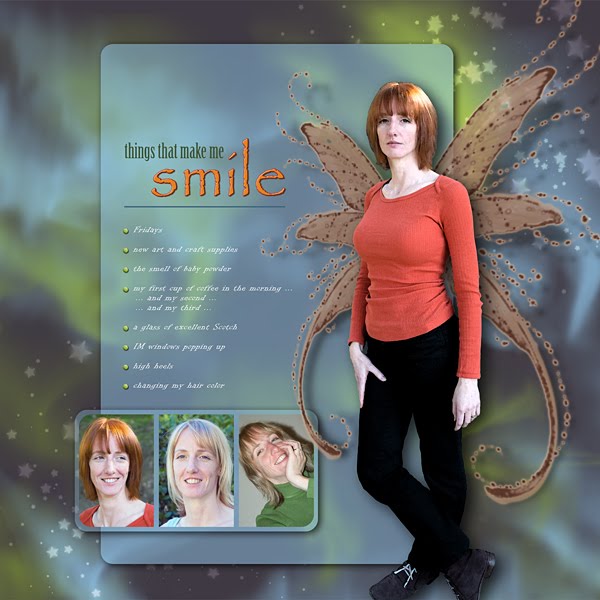
Smile

I used Photoshop’s Artistic Watercolor filter to create the effect on the large photo. For the rest I just played with digital brushes, shadows, and layer styles.

Brushes: Fairy Wings, Aurora Borealis, Glitter II by Stephanie Shimerdla (Obsidian Dawn), Brads: Janneke Smit. Software: Adobe Photoshop CS3, Fonts: Papyrus, Birch Std, Informal Roman.


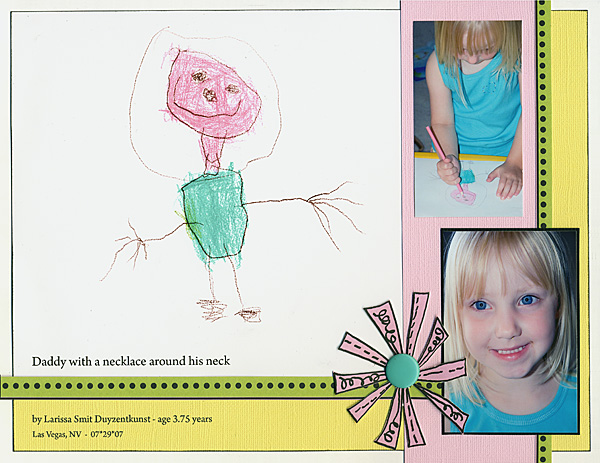
Daddy

I scanned my daughter’s artwork, reduced the size and added the title. Then I printed it out on matte photo paper. The flower and dotted strips are cut out from patterned paper. I glued the flower on some cardstock to make it a little sturdier.

Papers: Upsy Daisy Designs, Cardstock: Bazzill Basics Paper, Brad: Making Memories, Ink: Rubber Stampede. Software: Adobe Photoshop CS3, Font: Arno Pro.


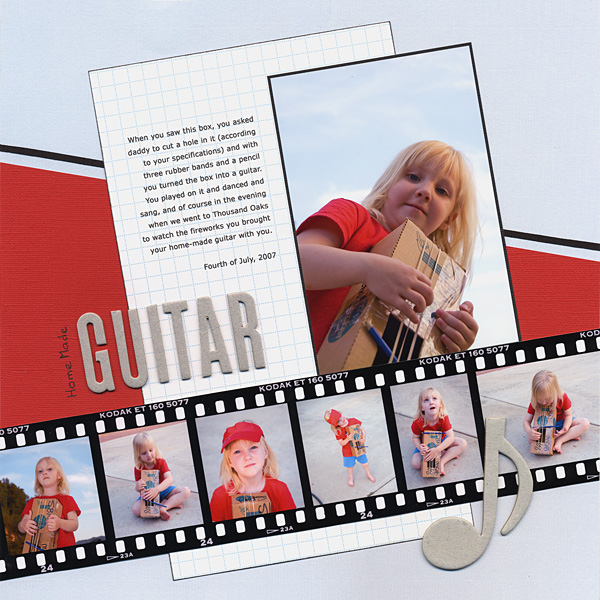
Home Made Guitar

I used a digital brush to create the filmstrip. I added the photos and divider strips and printed the whole filmstrip out on 14” photo paper.

Papers: My Mind’s Eye, Scenic Route, Cardstock: Bazzill Basics Paper, Chipboard: Deluxe Designs, American Crafts, Ribbon: Offray, Ink: Rubber Stampede, Pen: ZIG. Digital Supplies: Digea Film Brushes by Jelena Jovovic. Software: Adobe Photoshop CS3, Font: Verdana.


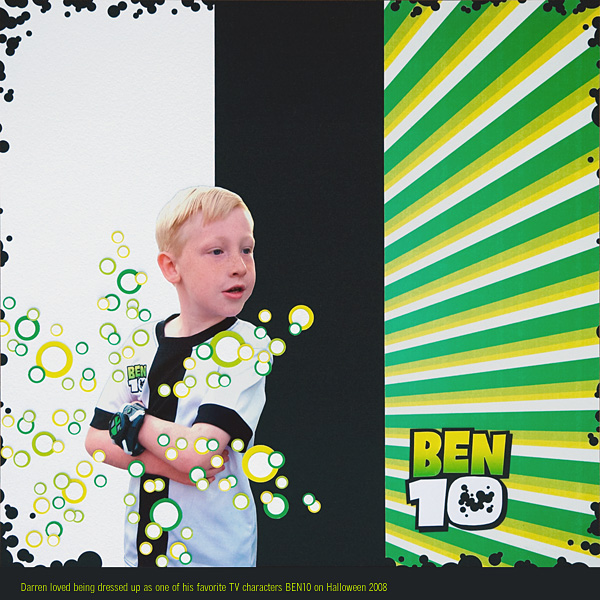
BEN10

For the design of this layout I was inspired by the images from the TV series (rays, bubbles radiating from the “omnitrix” watch) as well as the T-shirt BEN10/my son is wearing. The large black and white pieces in the background are cardstock, but I created and printed out everything else. I designed the patterned paper and the 3 different colors paper for the “bubbles”. I printed green journaling on a black background. And for the title I created a gradient paper and I used the official BEN10 logo as the shape to cut it out. I used circle punches in different sizes to create the bubbles. I also used punches around the borders of the page and inside the number ten before I backed these with black cardstock.

Cardstock: Bazzill Basics Paper, Photo Paper: Epson, Staples, Punches: EK Success, Marvy Uchida, Fiskars. Software: Adobe Photoshop CS3, Font: QuickType II Condensed.

Sunday, August 9, 2009

12" x 12" - Sketch 9


Please feel free to use this sketch for your personal use (only). I would love to see what you do with it! Please send me an email to show me your creation, then I will post it here too!

I used this sketch for "Security Tape Mummies", which was published in ScrapStreet Magazine in April 2008:

Saturday, November 1, 2008

October 2008 Published Work

These were my publications in the October 2008 issue of ScrapStreet Magazine:


Apple


Darren’s Halloween Art


ARR!


Glitter Nails

Digi kit: July Jeans by Dora Phillips and Michelle ‘Spink’ Boeckermann for ScrapStreet.com. Sketch by Michelle McClung.

Check out the glitter title! Cool huh? :)